What's New in ExpoCut 5.8
5.8 is the biggest ExpoCut release since the editor launched: a new text tray, a new timeline, a camera, a lighting studio, a warp engine, brushes, 3D — and a guide for every one of them. This is the map.
Quick answer
ExpoCut 5.8 (builds 5.8.0–5.8.5, September 2026) adds: a compact text tray over the live canvas with Surface materials (Transparent, Glass, Plastic, Glossy) and 101 Particles entrances; curved text (Arc, Circle, Wave) and Snake Path; a dedicated Urdu/Arabic text tool; three timeline styles (Classic, Main track, Compact) with a per-project switch; Cam Move with 88 camera presets, an on-canvas gizmo and Depth (Z) parallax; Light Studio regions with their own tone and look; Liquify plus a 15-warp Warp & Distort engine; a 35-effect blur & bokeh suite with Portrait, Subject and Face Blur; Brush strokes (134), 3D Object layers with .glb/.gltf/.obj import, Logo layers, Wizard mode for templates, Auto-Cut, an HD quality switch, and an AI agent connector with 279 tools. Every item below links to its guide.
- Text: compact tray, Surface materials, Particles, curved/snake paths, Urdu/Arabic tool — five guides.
- Timeline: Classic / Main track / Compact, row families, long-press arrange, Duplicate, HD quality switch.
- Camera & light: Cam Move presets + gizmo + Depth (Z); Light Studio regions with per-region looks.
- Effects: Liquify, Warp & Distort, blur/bokeh suite with Portrait/Subject/Face Blur, Datamosh, Glitter Field.
- Layers & flow: Brush, 3D Object, Logo, Collage on the Add Layer sheet; Wizard mode; Auto-Cut; 279 AI-agent tools.
5.8 shipped across five builds in mid-September. Rather than one long changelog, here’s the release as a set of doors — what each feature is, where it sits in the app, and the guide that walks through it with real screenshots.
The new Add Layer sheet
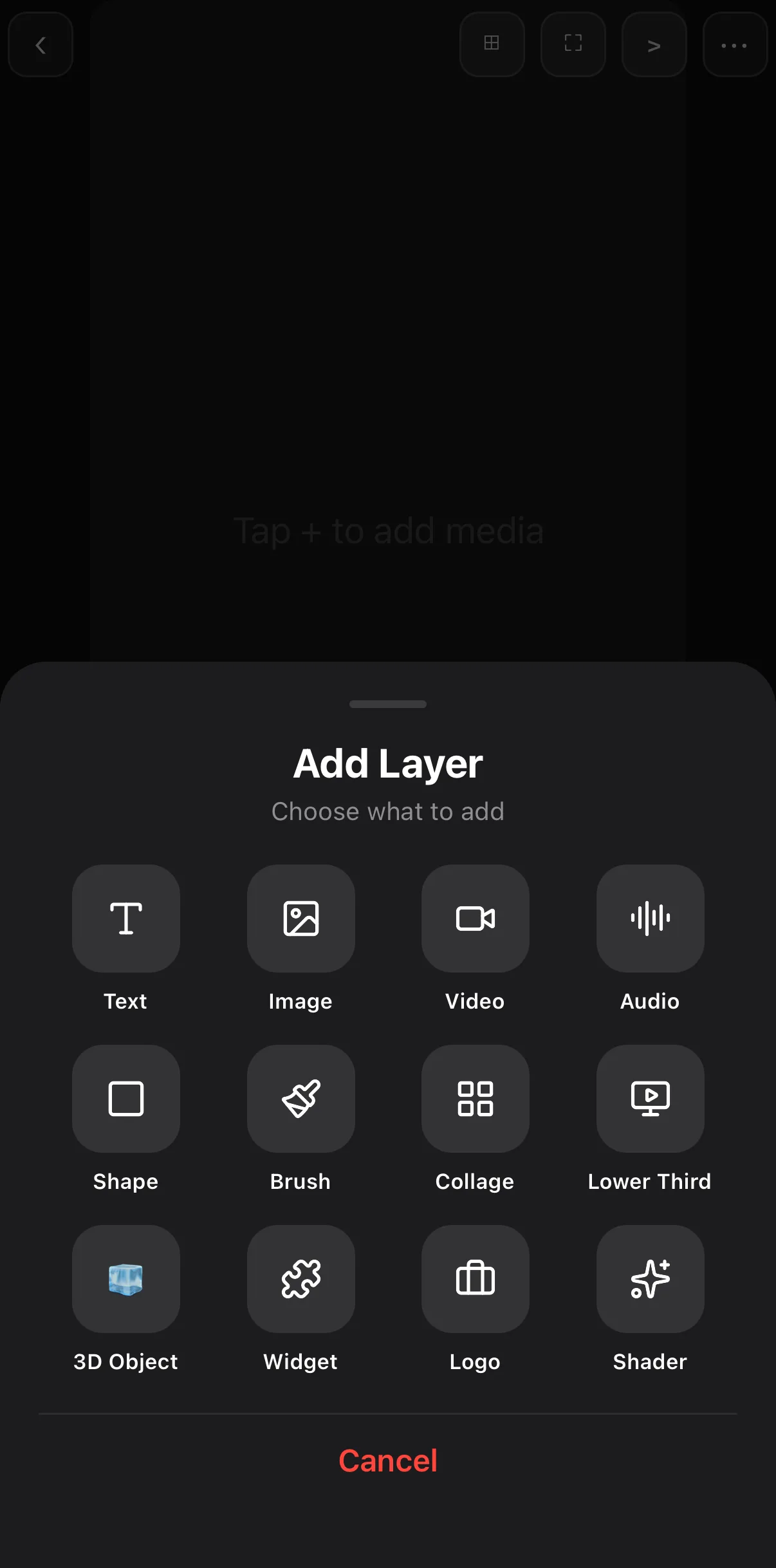 Brush · Collage · Lower Third · 3D Object · Widget · Logo · Shader
Text
| What | Where | Guide |
|---|---|---|
| Compact text tray — Text · Style · Fonts · Axes · Animate over the live canvas, rendered font samples, ‹ › width handles | Text ▸ Text | Add text & titles |
| Surfaces — Transparent, Glass, Plastic, Glossy with presets, bevel/depth/shine | Text tab ▸ Surface row | Glass, plastic & particle text |
| Particles — 101 entrance/exit companions; Sparkle Typewriter | Animate ▸ Starting/Ending ▸ Particles | Glass, plastic & particle text · Kinetic typography |
| Curved text & Snake Path — Arc, Circle, Wave; glyphs that crawl along a motion path | Axes ▸ Path · Motion ◇+ ▸ Snake | Curved text & snake path |
| Urdu/Arabic tool — RTL tray, 44 Nastaliq/Naskh faces, export fix | Text ▸ Urdu/Arabic | Urdu & Arabic titles |
| Lower thirds — 52 presets incl. RTL | Text ▸ Lower 3rd | Lower thirds & name tags |
Timeline & editing
| What | Where | Guide |
|---|---|---|
| Three timeline styles — Classic, Main track (magnetic), Compact; per-project switch; default in Settings | Transport strip ▸ Timeline style | Timeline styles explained |
| Row families, long-press arrange, Duplicate, corner grip rotation | Timeline / canvas | Mobile video editor guide |
| HD quality switch — export from the original file, not the proxy | Trim Clip sheet | Best export settings |
| Junction transitions on the + joiner between clips | Timeline | Add transitions |
| Auto-Cut silence removal; long-video-to-short via the AI agent | Clip toolbar · AI Agent | Auto-Cut & long video to short |
Camera, light & colour
| What | Where | Guide |
|---|---|---|
| Cam Move — 88 presets, on-canvas gizmo, Depth (Z) parallax | Bottom bar ▸ Cam Move | Camera moves & parallax |
| Light Studio — stackable regions with their own tone and look | Edit ▸ Light | Light & grade regions |
| Filters, LUTs, Color Grade card | Edit ▸ Filters / LUTs / FX ▸ Filters ▸ Looks | Colour grading on your phone · How to use LUTs |
Effects
| What | Where | Guide |
|---|---|---|
| Liquify — Push, Bloat, Pucker | Clip toolbar | Liquify, warp & distort |
| Warp & Distort engine — 15 warps incl. Fisheye, Tiny Planet, Kaleido | Edit ▸ FX ▸ Filters | Liquify, warp & distort |
| Blur & bokeh suite — 35 looks; Portrait, Subject and Face Blur | Edit ▸ FX ▸ Filters · clip toolbar | Blur part of a video |
| Remove BG (Elite) next to Subject Blur | Clip toolbar | Remove a video background |
| Shader overlays — Fireflies, Snow, Dust, Light Orbs with Transparent BG | Shader ▸ Abstract | Shaders & generative backgrounds |
| Datamosh, Glitter Field, retuned filter defaults | Edit ▸ FX | Video effects guide |
New layers
| What | Where | Guide |
|---|---|---|
| Brush — 134 hand-drawn strokes as shape layers | Bottom bar ▸ Brush | Brush strokes & hand-drawn overlays |
| 3D Object — 13 shapes, materials, animations, .glb/.gltf/.obj import | Bottom bar ▸ 3D | Add 3D objects to a video |
| Logo from any photo; brand profiles with Watermark & Bumpers | + ▸ Logo · Settings ▸ Brand & Influencer | Logo & brand kit |
| Collage on the Add Layer sheet; Grid / Mosaic / Diamond / Freeform / Shape | + ▸ Collage | Split-screen & collage |
Templates & automation
| What | Where | Guide |
|---|---|---|
| Wizard mode — slot filler with a live canvas, chip strip, Timeline ⇄ Wizard | Templates ▸ Use this Template | Wizard mode |
| Share to Community, template import from URL | ••• · Templates ▸ + Add | Save your own template · Import .mogrt & more |
| AI agent connector — 279 tools, free on every plan | Settings ▸ AI Integration | Automate with MCP & the engine |
Fixes worth knowing
- Downloaded Urdu/Arabic faces now render in the iOS export; text stroke, shadow, pill and letter-spacing export at canvas size.
- Shader backgrounds no longer export mirrored; Android GPU overlays no longer black-box; shader filters survive Android’s CPU export path.
- The paused canvas stacks layers by row, exactly like playback and export; one Undo rolls back exactly one edit.
- Audio only lands on audio rows; junction transitions are in the undo history.
The full build-by-build list is on the changelog.
Where to start
New to the app? Make your first video, then the mobile video editor guide. Coming from an older version? Try the timeline styles and the text tray first — everything else hangs off those two.
Frequently asked questions
What are the biggest changes in ExpoCut 5.8?
The compact text tray with materials and particle entrances, three timeline styles with a magnetic main track, the Cam Move camera with depth parallax, Light Studio regions, Liquify and the Warp & Distort engine, the blur and bokeh suite with Portrait/Subject/Face Blur, and new layer types — Brush, 3D Object, Logo. Templates gained Wizard mode and Auto-Cut removes silences.
Do I need to relearn the editor?
The bottom bar, the pencil (Edit) toolbar and the Add Layer sheet are the same places — they just have more in them. The one behavioural change is the timeline style: Classic is still the default, and Main track is opt-in per project or in Settings ▸ Timeline.
Are the new features free?
Everything in this list is on every plan except Remove BG, Subject Blur and Portrait Blur, which carry an Elite badge. Free exports end with a 3-second ExpoCut outro; Pro and Elite exports are clean.
Related guides
Update and try it
Every 5.8 feature has a guide with fresh screenshots — pick one and build something.
Get ExpoCut Browse all guides