How to Make a TikTok Video (That People Actually Watch)
TikTok is brutal on slow starts and rewards rhythm and re-watches. The edit is the strategy: hook instantly, cut fast, caption everything, and loop the ending back to the start. Here’s how.
Quick answer
To make a TikTok in ExpoCut: start a 9:16 project, add your clip and trim it tight in the Trim Clip sheet (drag the right handle in), add a Text hook like “WAIT FOR IT” with a bold style from the tray’s Style tab, cut on the beat with Split, apply one Filter, add captions, then ••• ▸ Export Video at 1080p · 9:16 · High · MP4 · 30 fps. Free exports end with a 3-second ExpoCut outro; the picture is never watermarked.
- 9:16 is the first tile in the Format sheet; the Export sheet labels it “TikTok · Reels · Shorts”.
- Trim in the Trim Clip sheet the moment the clip lands — TikTok has no patience for setup.
- The hook is a Text layer: type it, pick a loud style (Highlight Yellow, IMPACT TITLE, Bold White) and keep it centre-left.
- Export at 1080p / High / 30 fps; leave Bitrate on Auto. 60 fps only if you shot at 60.
- Your default brand profile (watermark, bumpers) is applied automatically at export — check the Brand Watermark row at the bottom of the sheet.
TikTok punishes a slow start and rewards rhythm. The winning edit is fast: hook in the first second, punchy cuts, captions on screen, and an ending that loops back to the beginning. Here’s the whole build.
Step 1 — Vertical, and straight to the point
Start a 9:16 project (basics here) — it’s the first tile in the Format sheet. Cut your clips tight — TikTok has no patience for setup. When a clip lands, the Trim Clip sheet opens: drag the right handle in so only the part that earns its place survives.
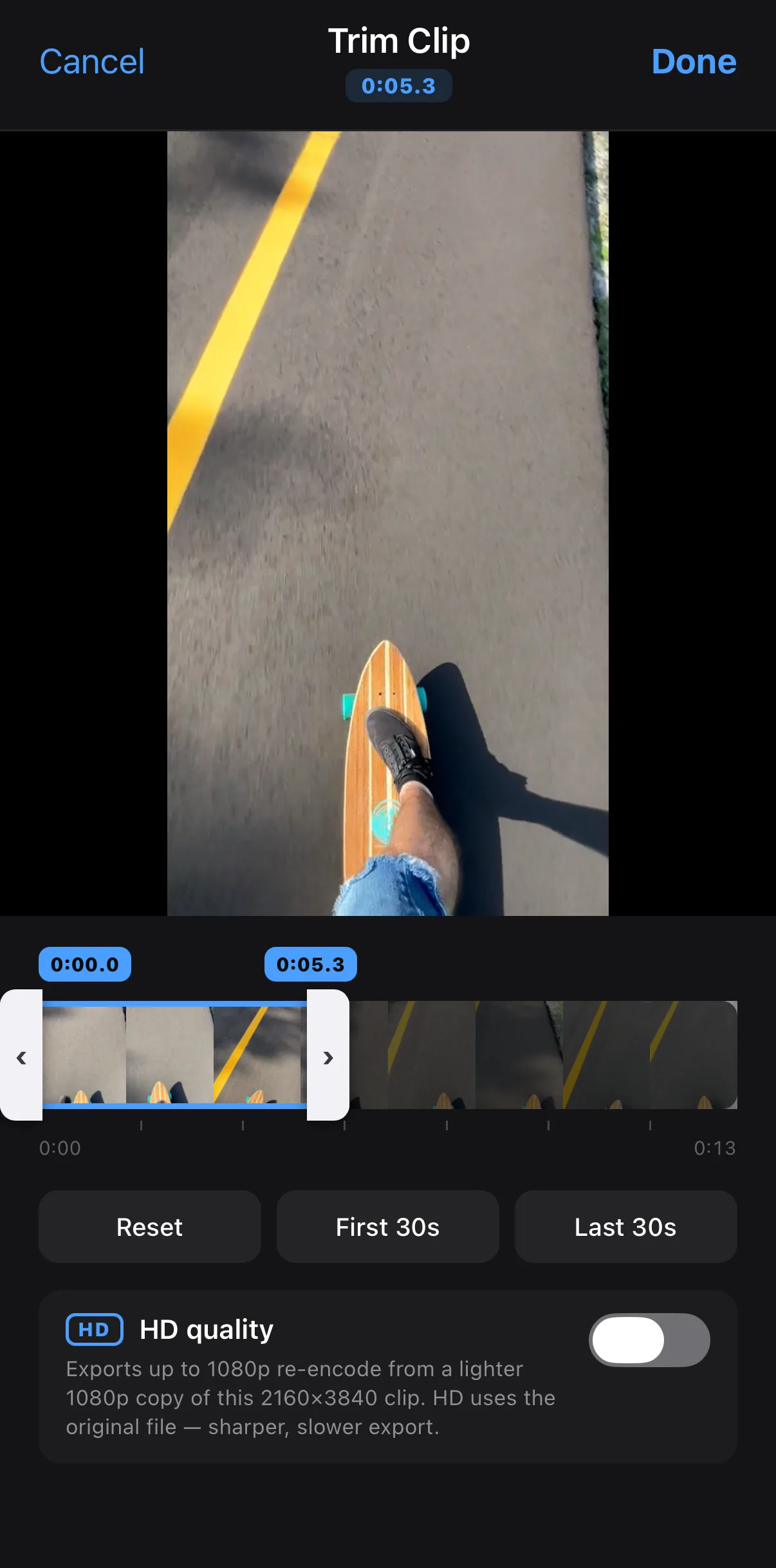 5 s, not 14
Drag the right handle in
5 s, not 14
Drag the right handle in
Start a 9:16 project
Home ▸ New Project ▸ 9:16 ▸ Video ▸ Gallery or Stock.
Trim tight
In the Trim Clip sheet, drag the right handle in to the moment that matters. Tap Done.
Add the hook
Bottom bar Text ▸ Text, type the line, pick a loud style on the Style tab, tap ✓ and drag it centre-left.
Cut, filter, caption
Split on the beat, apply one Filter to the clip, add captions (Transcribe or word-by-word text).
Export
••• ▸ Export Video ▸ 1080p · 9:16 · High · MP4 · 30 fps ▸ Export.
Step 2 — Hook in the first second
Open on the most interesting frame and slap a text hook on it that promises the payoff (“Wait for it,” “Here’s the trick”). If the gold is at 0:08, move it to 0:00 and tease it.
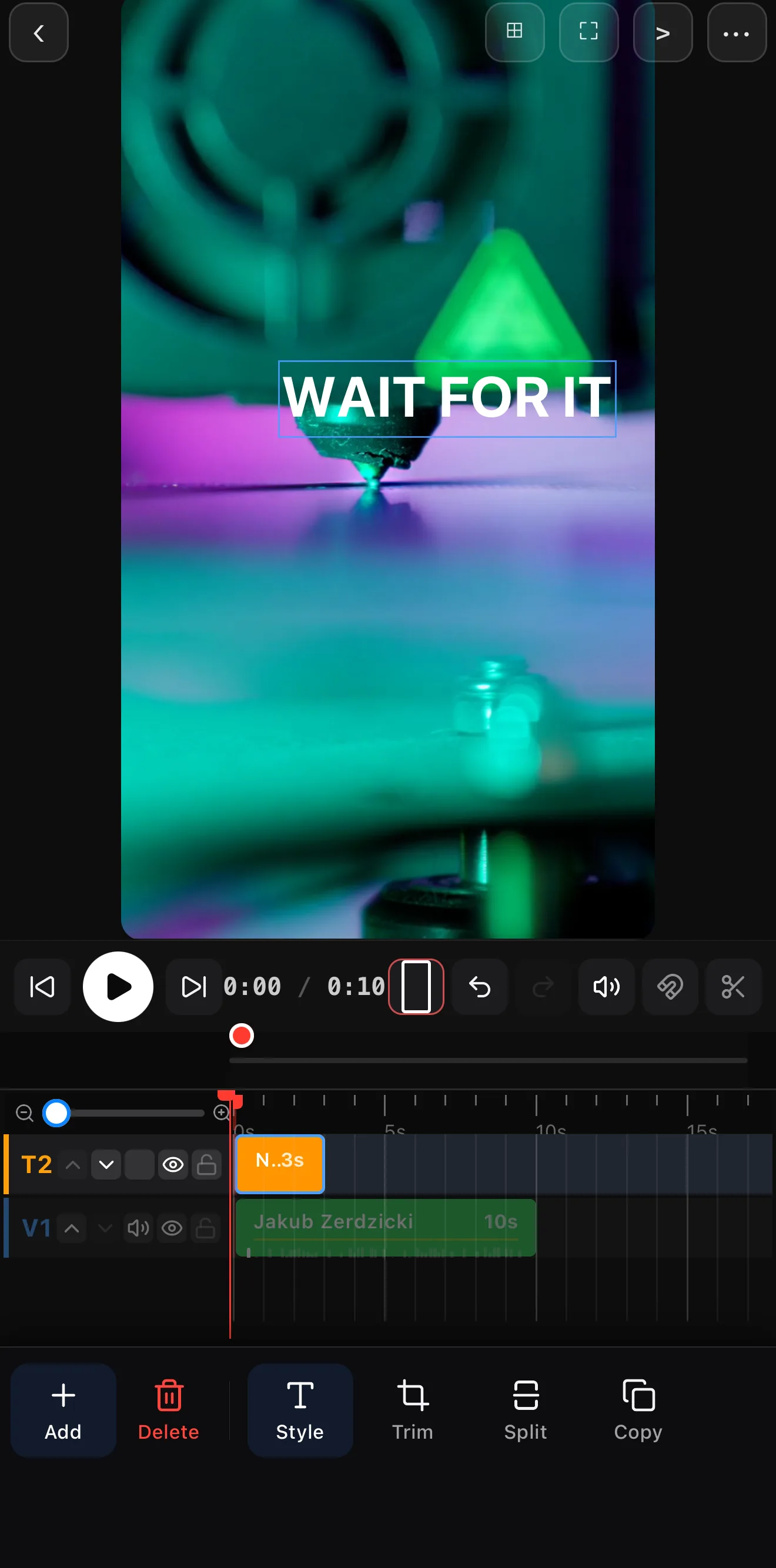 Hook text in the first second
Highlight Yellow
Hook text in the first second
Highlight Yellow
Step 3 — Fast cuts and a filter
Cut on the beat and keep the pace up — quick clips, a speed ramp into a key moment, a flash transition on a hit. Apply one filter across the whole thing so it feels intentional.
Step 4 — Caption it (kinetic style)
Captions are non-negotiable on TikTok. Go word-by-word kinetic for that native, punchy feel — each word popping as it’s spoken.
Mind the right edge. TikTok’s like/comment/share buttons live on the right and the username/caption at the bottom. Keep your text and subject toward the center-left and upper area.
Step 5 — Loop it, then export
End on a beat or a line that flows into your first frame so it loops seamlessly. Then ••• ▸ Export Video. The sheet opens at 480p / Low / 24 fps — change it to 1080p · 9:16 · High · MP4 · 30 fps and leave Bitrate on Auto. Full details in the export guide.
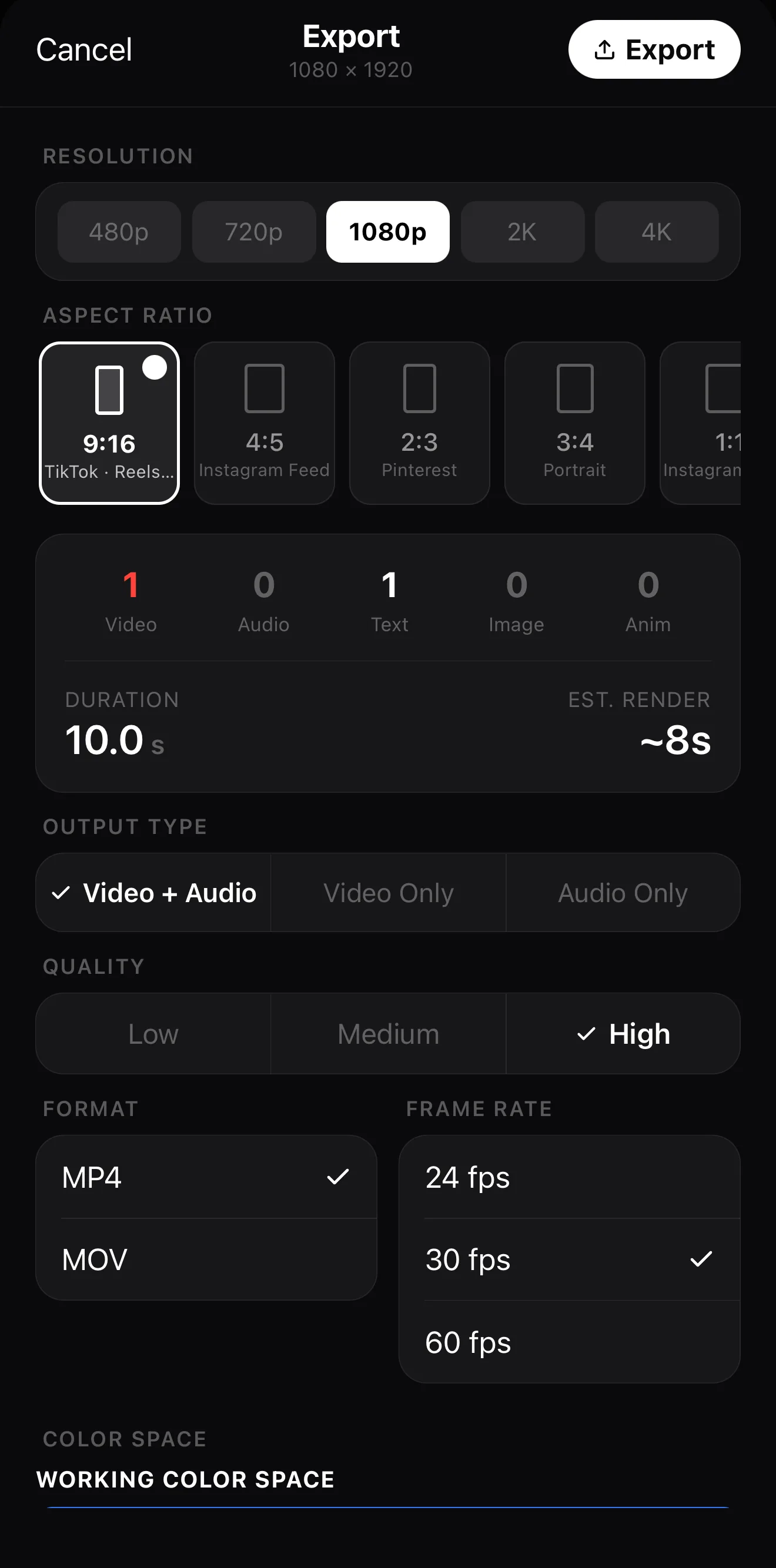 1080p
9:16
High
Bitrate — Auto is fine
1080p
9:16
High
Bitrate — Auto is fine
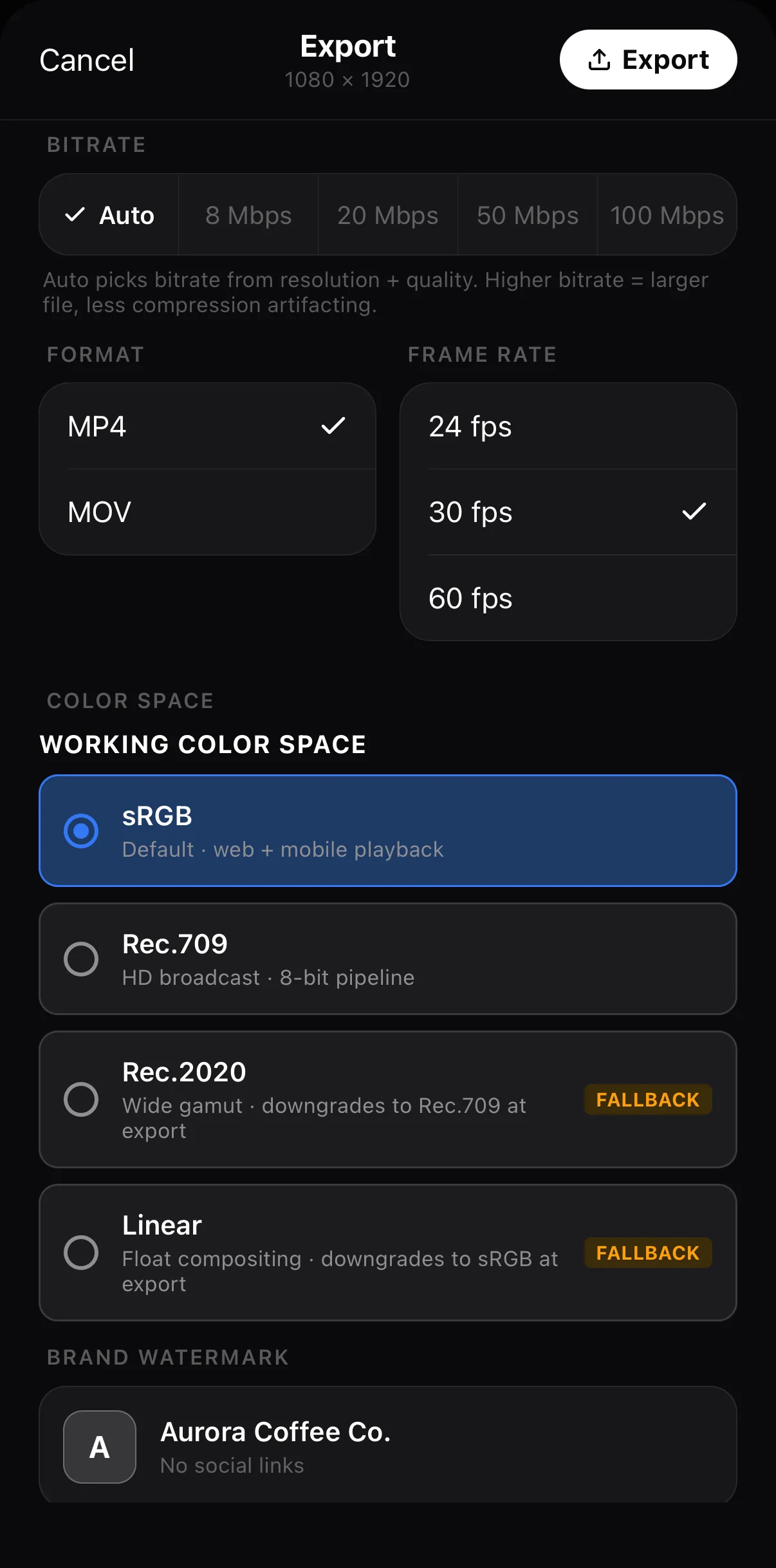 30 fps
Brand profile auto-selected
30 fps
Brand profile auto-selected
On the Free plan the file ends with a short 3-second ExpoCut outro; Pro and Elite exports are clean. Post with trending audio where it fits.
Where to go next
- The fundamentals: make your first video.
- Punchy captions: add captions & subtitles.
- Speed for emphasis: slow motion & speed ramps.
Hook fast, cut faster, caption it, loop it — that’s the TikTok edit that turns a scroll into a rewatch.
Frequently asked questions
What size is a TikTok video?
9:16 vertical, 1080×1920 — full screen. Build a 9:16 project and keep captions and key action clear of the bottom and right edge where TikTok's buttons and caption sit.
How do I hook viewers on TikTok?
In the first second. Open on motion, a bold claim, or a question — and put a text hook on screen restating the payoff. If your best moment is buried, cut straight to it. There's no time for an intro.
Why do looping TikToks get more views?
A clean loop makes the end flow back into the start, so viewers watch twice before realizing it — and watch-time is what TikTok pushes. End on a beat or a line that hands off to your opening frame.
Does ExpoCut add a watermark to TikTok exports?
No watermark on the picture. On the Free plan the finished video ends with a 3-second ExpoCut outro; Pro and Elite exports are clean. Your own brand watermark, if you set one up in Settings ▸ Brand & Influencer, is applied automatically.
Related guides
Edit a TikTok that holds
Instant hook, fast cuts, captions, a clean loop — the TikTok edit that earns re-watches. Cut it on your phone.
Get ExpoCut Browse all guides