How to Make a YouTube Short (Step by Step)
YouTube Shorts reward clarity and a strong hook in a vertical, sub-60-second frame. They’re also a discovery engine for your channel. Here’s how to cut one that earns the watch and the subscribe.
Quick answer
To make a YouTube Short in ExpoCut: New Project ▸ 9:16, add and trim your clip to under 60 s, add a Text hook that states the payoff (“FIX THIS IN 30s”) with a bold style and park it in the upper-centre safe zone, cut quickly and apply one Filter, add captions and a channel nudge in the last beat, then ••• ▸ Export Video at 1080p · 9:16 · High · MP4 · 30 fps and upload with #Shorts in the title.
- Same 9:16 build as a Reel or TikTok — the difference is intent: a Short funnels viewers to your channel.
- The hook is a Text layer with a bold style (News Title, IMPACT TITLE, Bold White) placed high, clear of the bottom UI.
- One idea, ≤ 60 s. End when the idea is done — don’t pad to a length.
- Captions are mandatory for muted viewers; keep them upper-centre.
- Export 1080p · 9:16 · High · MP4 · 30 fps; the sheet remembers your frame rate between projects but resets resolution and quality.
Shorts are YouTube’s discovery funnel — a vertical, sub-60-second clip that, done right, sends new viewers to everything else you make. The edit is fast and familiar; the intent is what makes a Short pull its weight.
Step 1 — Vertical and short
Start a 9:16 project (basics) — the first tile in the Format sheet — and commit to ≤ 60 seconds. Trim hard in the Trim Clip sheet as each clip lands; a Short is one idea, delivered cleanly, not a highlight reel.
New Project ▸ 9:16 ▸ Video
Add from Gallery or Stock; drag the trim handles to the part that matters.
Add the hook
Text ▸ Text, type the promise, pick a bold style on the Style tab, ✓, then drag it into the upper-centre safe zone.
Cut and grade
Split for pace, one Filter (pencil ▸ Filters) on every clip, a zoom or speed beat on the key moment.
Caption + channel nudge
Add captions; end with a “part 2” or “full video on the channel” beat.
Export
••• ▸ Export Video ▸ 1080p · 9:16 · High · MP4 · 30 fps.
Step 2 — Hook that survives the swipe
Open on the result or the question, not the setup. State the value immediately — “Here’s how to fix X in 20 seconds” — with a text hook on screen. Every second between the swipe and the payoff is a chance to lose them.
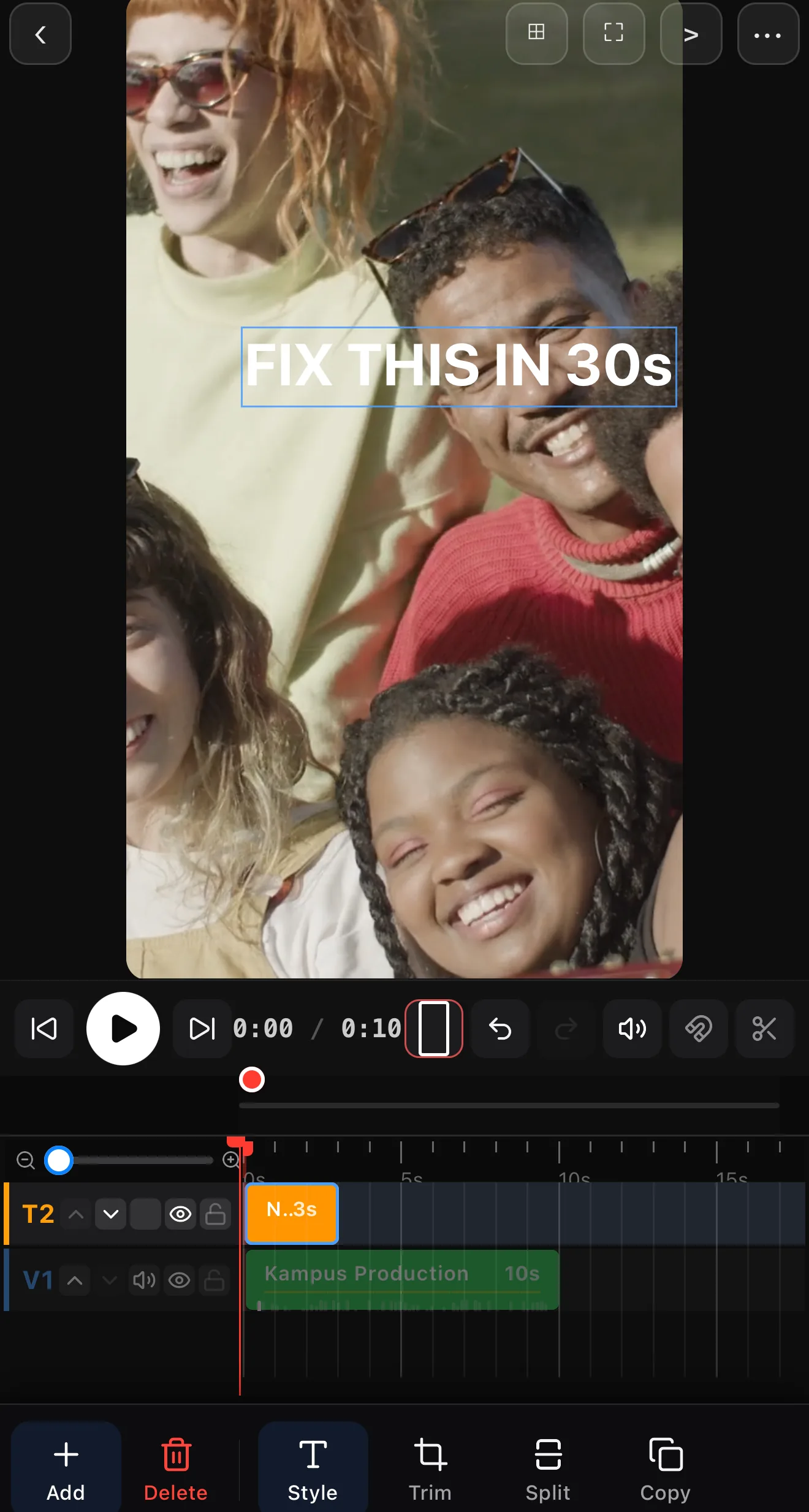 A promise in the first second, upper safe zone
Step 3 — One clear idea, well-paced
Deliver a single takeaway. Use quick cuts to keep momentum, a filter for a consistent look, and a zoom or speed beat to emphasize the key moment. Don’t pad it to hit a length — end when the idea’s done.
Step 4 — Captions and a channel nudge
Caption the whole thing for muted viewers and retention. In the last beat, give a reason to explore your channel — a tease of the full video, a “part 2,” or a clear CTA.
Keep text centered and high. Shorts show the title and channel info along the bottom — keep captions and key visuals in the upper-center safe zone.
Step 5 — Export
Tap ••• ▸ Export Video and set 1080p · 9:16 · High · MP4 · 30 fps (the sheet opens at 480p / Low, so change the first two every time) — details in the export guide. Upload and write a clear title with “#Shorts” so YouTube routes it correctly.
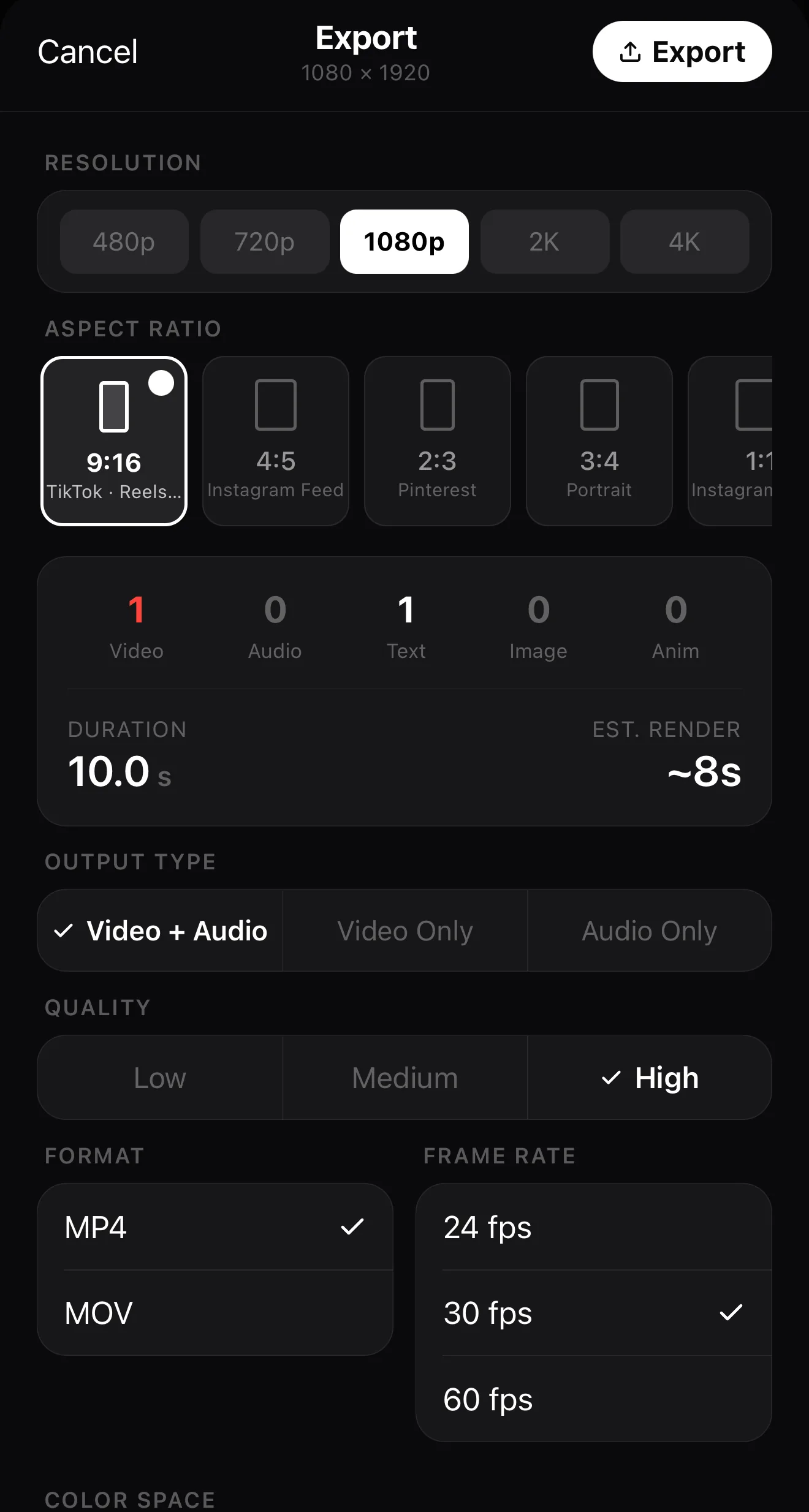 1080p
9:16 — vertical for Shorts
High
30 fps
1080p
9:16 — vertical for Shorts
High
30 fps
Where to go next
- The fundamentals: make your first video.
- Caption for retention: add captions & subtitles.
- Emphasize the key beat: keyframes & motion paths.
Vertical, tight, hook-first, captioned — a Short that delivers one idea cleanly is the best ad your channel can run.
Frequently asked questions
What size and length is a YouTube Short?
9:16 vertical and 60 seconds or less. Build a 9:16 project, keep it tight, and make sure the payoff arrives well before the time limit.
How are Shorts different from Reels and TikToks?
The edit is nearly identical — vertical, fast, captioned. The difference is intent: Shorts are a discovery funnel to your longer YouTube content, so a clear value-per-second and a reason to check your channel matter even more.
Do I need captions on a Short?
Yes. Many viewers watch muted, and on-screen text also boosts retention. Auto-caption it and keep lines short and centered, clear of the bottom UI.
Related guides
Cut a Short that converts
Vertical, under 60s, hook-first, captioned — the Short that earns the watch and points to your channel. Edit it on your phone.
Get ExpoCut Browse all guides