Etsy AI Rules 2026: What You Can't Use in Listings Anymore
On October 22, 2026 Etsy rewrote its AI rules. Every listing now needs one untouched photo of the real item, AI-written patterns and recipes are banned, and bot-made listings can get a whole shop removed. Here is the do-not-use list, taken from Etsy’s own policy pages, plus what you can still do and how to make a listing video that passes.
Quick answer
Since October 22, 2026 an Etsy listing must include at least one unedited photo of the actual item against a real background — no crop, no filter, no background swap, no AI. You may still edit your other photos, with AI included, as long as the item looks exactly like what the buyer gets. You can no longer sell AI-written patterns, recipes, plans or instructions, publish bot-generated listings, or sell AI prompt bundles. AI art is still allowed when you wrote the prompts and say so in the description. Listing videos are untouched by the new rules but must show the real item: shoot real footage, trim it to 5–15 seconds at 1:1 or 4:5, keep colour true to life, add on-screen text (Etsy strips audio) and export 1080p MP4 under 100 MB.
- One photo per listing must be straight off the camera: no crop, no colour fix, no background change, no AI. Everything else can be edited.
- Banned outright: AI-generated patterns, recipes, plans and manuals; bot-generated listings; AI prompt bundles.
- Still allowed: AI art from your own prompts (disclosed in the description) and AI edits on your secondary photos.
- If a buyer wins a ‘materially different’ case and your photos broke the rules, you pay the refund.
- Listing videos: real footage only, 5–15 s, 1:1 or 4:5, 1080p MP4, under 100 MB, no audio needed — ExpoCut’s Free plan adds a 3-second outro, so keep the edit to 12 s or export on Pro.
Etsy’s new AI policy comes down to one sentence: buyers must see the real item at least once, untouched. Everything else in this guide follows from that. The rules took effect on October 22, 2026 with no grace period, so listings that break them need fixing now — Etsy’s own FAQ says so.
This guide quotes Etsy’s three policy pages (the Listing Image Requirements, the Stance on AI Creations article and the Important updates to AI use announcement) and nothing else. Links are at the bottom. Where Etsy is vague, we say so rather than guess.
- The real item on a real background
- No crop, colour fix, filter, background change or AI
- Upload the file exactly as the camera saved it
- Edit your other photos, AI included
- AI art from your own prompts, disclosed in the description
- Listing videos of the real item
- AI-written patterns, recipes, plans and guides
- Bot-generated listings and prompt bundles
- Edits that hide damage or change the item
What changed on October 22, 2026?
Five rules, in Etsy’s order:
| Rule | What it means |
|---|---|
| One unedited photo | Most listings must include at least one photo of the actual item against a real background that “hasn’t been edited or changed in any way”. |
| Every photo must be accurate | No hiding flaws, no making the item look different. Other photos may be edited, with AI included. |
| No AI-generated functional guides | Patterns, recipes, plans, manuals and instructional guides must be your own work, and must show a real finished result. |
| You pay the refund | If your photos broke the rules and a buyer opens a “materially different” case, you may owe the refund. |
| No bot-generated listings | Listings made with no human involvement are removed, and the shop can go with them. |
Two things did not change. Etsy’s Creativity Standards (the Made by / Designed by / Handpicked by / Sourced by labels) are still dated June 10, 2025, and the listing video specs are unchanged.
What can’t you use in an Etsy listing anymore?
This is the list people search for, so here it is in plain words. Do not use:
- An edited photo as your “real” photo. The required photo cannot be cropped, straightened, colour-corrected, filtered, background-swapped or touched by AI. Etsy’s wording is “not edited or changed in any way”.
- An AI-generated picture of a physical item as proof of the item. An AI approximation that “does not accurately reflect the color, texture, quality, or other characteristics” is listed as prohibited in Etsy’s examples.
- An AI rendering as the only finished-result image. If you sell craft patterns, recipes, seeds or kits, at least one photo must be a real, unedited photo of something made with your product. AI images cannot be the only result shown.
- AI-written instructions. Knitting, crochet, sewing, embroidery, quilting and beading patterns, recipes, woodworking and building plans, assembly manuals and how-to e-books must be written by you.
- Bot-generated or script-mass-produced listings. Etsy says every item needs “direct, individual human prompting, curation, and creative input”. Mass-automated generation without individual oversight is prohibited.
- AI prompt bundles. Banned since 2024 and still banned.
- Edits that change what the buyer gets. Changing the item’s actual colour, texture or condition, digitally removing cracks or damage, or using AI to change the core design of a physical item.
- Fake inventory. Using AI to invent items you do not have is called out as fraud.
- From January 1, 2027, undisclosed AI “synthetic performers”. Etsy points sellers to California’s SB 1050: listing images or videos that prominently feature an AI-generated human-looking performer may need a clear disclosure if they reach buyers in California.
The trap most sellers will fall into is number 1. Phones auto-apply HDR, portrait blur and “enhance” modes. Etsy has not said whether automatic in-camera processing counts as editing. The safe move is to turn those modes off for the one required shot and upload the file the camera saved, without opening it in any editor first.
What happens if you break the rules?
Every item on the do-not-use list runs through the same pipeline. The grey line under each ban is the problem Etsy says it creates, which is why it is on the list.
- An edited or AI "real" photoBuyers can't judge the true colour, texture or condition
- An AI picture of a physical itemAn approximation that doesn't match what ships
- An AI image as the only finished resultPatterns and kits that can't produce what the photo shows
- AI-written patterns, recipes and plansErrors surface only after time and materials are spent
- Bot-generated listingsNo human prompting, curation or creative input
- Edits that hide damage or change the designThe buyer receives something materially different
- AI-image detection in the listing formTips appear when you upload; coming to existing listings
- Buyer report: "misleading AI imagery"New reason on Report this item; research only at first
- Proactive detection sweepsEtsy is investing in tools to find fake inventory
- A buyer case: "materially different"Opened after delivery, judged against your photos
- Listing removedAppeal from the Policy violations page in Shop Manager
- You refund the buyerWhen the photos broke the rules and the case is upheld
- Repeat violations: shop removedBot listings can cost the shop on their own
- Buyer trustEtsy says AI doubt is a top-three reason buyers shop less
Etsy announced enforcement in four layers:
- Tips in the listing form. When you add an image Etsy detects as AI-generated, the form shows guidance. This will extend to existing listings over time.
- Buyer reports. A new “misleading AI imagery” reason is being added to the Report this item flag. Etsy says these reports will not trigger immediate action at first.
- Removals and appeals. Misleading listings are removed. Appeals go through the Policy violations page in Shop Manager.
- Refund liability and shop removal. Repeated violations can end in shop removal, and a lost “materially different” case can cost you the refund.
Etsy’s VP of Customer Operations called these changes “our starting point, not the finish line”, and said Etsy is building tools to help sellers demonstrate authorship. Expect the rules to tighten, not loosen.
What can you still use?
Etsy published an allowed-versus-prohibited table for the other photos in your listing. Paraphrased:
| Allowed on secondary photos | Prohibited everywhere |
|---|---|
| Adjusting lighting, exposure or colour balance to match real life | Changing the product’s actual colour, texture or condition |
| Cropping, resizing, straightening | Digitally removing or hiding defects, cracks or damage |
| Cleaning up or replacing the background, including with AI, as long as the item is accurate | Using AI to change the core design or features of a physical item |
AI art is still welcome. Etsy keeps allowing “seller-prompted AI creations” — a fantasy scene from your own prompt, a custom pet portrait made with AI tools — as long as you disclose the AI use and do not call it handmade. Etsy files these under Designed by a seller, not Made by a seller.
Which rules apply to your product type?
The unedited-photo rule has exceptions, and they depend on what you sell:
| You sell | What Etsy asks for |
|---|---|
| Physical handmade or vintage items | At least one unedited photo of the real item on a real background. |
| Print-on-demand (a partner prints your design on a standard base) | A stock mockup is fine if its owner authorised its use. |
| Digital downloads with a visual (printables, templates, graphics) | A visual preview or excerpt of what the buyer receives. |
| Digital downloads with no visual (audio files) | Representative imagery, AI images included, as long as it is not misleading. |
| Customised or made-to-order | Real photos of finished pieces you made before. |
| Patterns, recipes, seeds, kits | At least one real, unedited photo of a finished result. AI cannot be the only result image. |
How do you disclose AI on Etsy?
Etsy asks for disclosure in two places, and recommends a third:
- The listing description. Required whenever “an item is created with the use of AI”. One honest sentence is enough: “This print was created from my own prompts with an AI image generator, then colour-corrected and arranged by hand.”
- The “How it’s made” tab. Choose the path that describes your role truthfully. Seller-prompted AI creations belong under Designed by a seller.
- AI-edited photos. Not required, but Etsy’s best-practice list says to note it in the description when any listing photo was edited with AI. Example: “Photo 1 is the unedited item. Photos 2–4 had the background replaced with AI.”
Etsy also says to make your first photo the clearest, most realistic one, because it is the image buyers see in search.
Do the new rules apply to listing videos?
Strictly, no. The new requirement says photo, and the video specs did not move. But Etsy’s Creativity Standards already require Made by and Handpicked by listings to “use original photo or video content of the final product”, and the AI article bans imagery that misrepresents an item. So an AI-generated clip of a physical product, or AI-animated product shots, are exactly the “misleading AI imagery” buyers can now report.
The specs you need to hit, from Etsy’s help page:
| Spec | Value |
|---|---|
| Videos per listing | up to 2 |
| Length | 5–15 s (one Etsy page says 3 s minimum; 5 is safe) |
| File size | 100 MB maximum |
| Formats | MP4, MOV and most common types |
| Resolution | 500 px minimum, 1080 px ideal |
| Aspect ratio | between 2:1 and 1:2 — square or 4:5 is safest |
| Audio | removed on upload |
The real-footage rule is good news for a 15-second product video: you do not need any AI at all, just a phone and good light.
How do you make a listing video that passes, in ExpoCut?
ExpoCut cannot make your required unedited photo — nothing exported from any editor is “unedited”. Its job is the two listing videos, your edited secondary photos and your social clips. The recipe below uses only everyday editing, which Etsy explicitly allows.
Shoot the real item
Film 20–30 seconds in daylight, slowly, at phone resolution or higher. Turn off portrait mode and filters in the camera app. Shoot the required photo in the same session and leave that file alone.
Trim to 15 seconds or less
Add the clip and trim it to the best 5–15 seconds. On the Free plan ExpoCut adds a 3-second outro card to the export, so keep the edit at 12 seconds so the file stays under Etsy’s 15-second limit — or export on Pro or Elite, which have no outro.
Set the canvas to 1:1 or 4:5
Pick the aspect ratio in the project settings. Both sit inside Etsy’s 2:1 to 1:2 range and fill a phone screen in search. Reframe on the clip toolbar keeps the item centred when you switch from the 9:16 or 16:9 you filmed in. The same preset works for an Instagram feed post.
Steady and true-to-life, nothing more
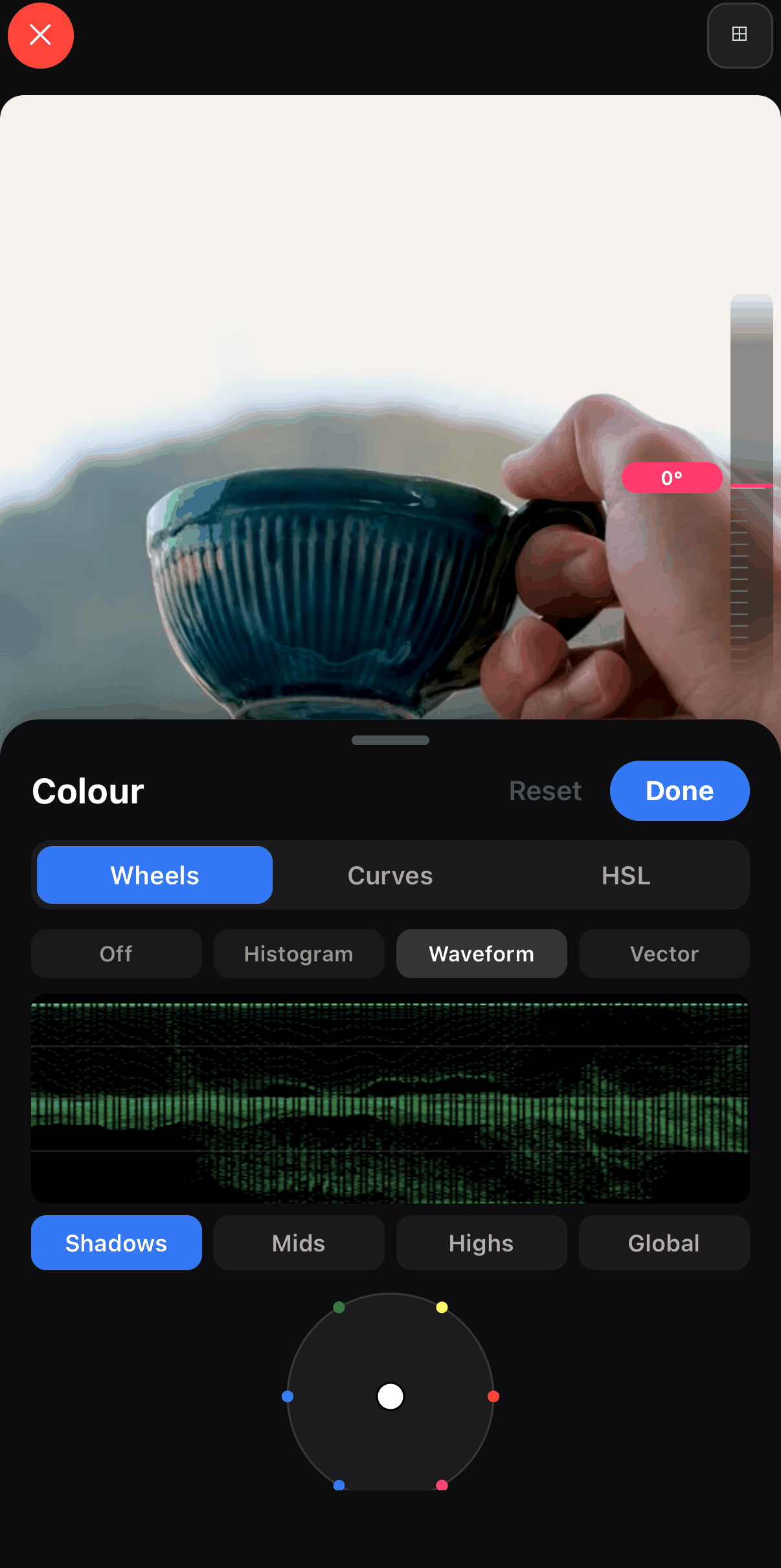
Tap Stabilize on the clip toolbar if you filmed handheld. Then tap the pencil (Edit) and open Color: correct white balance so the item matches what it looks like in daylight, check the Waveform scope that nothing is clipping, then stop. Skip the filters and LUTs on the product itself; a look that shifts the item’s colour is a prohibited edit, not a style. Our colour grading guide covers the Color panel.
Say it on screen
Etsy strips audio, so the words have to be visible. Add two or three text layers: size, material, “handmade by me”, personalisation options. Keep each one on screen for at least three seconds.
Export 1080p MP4
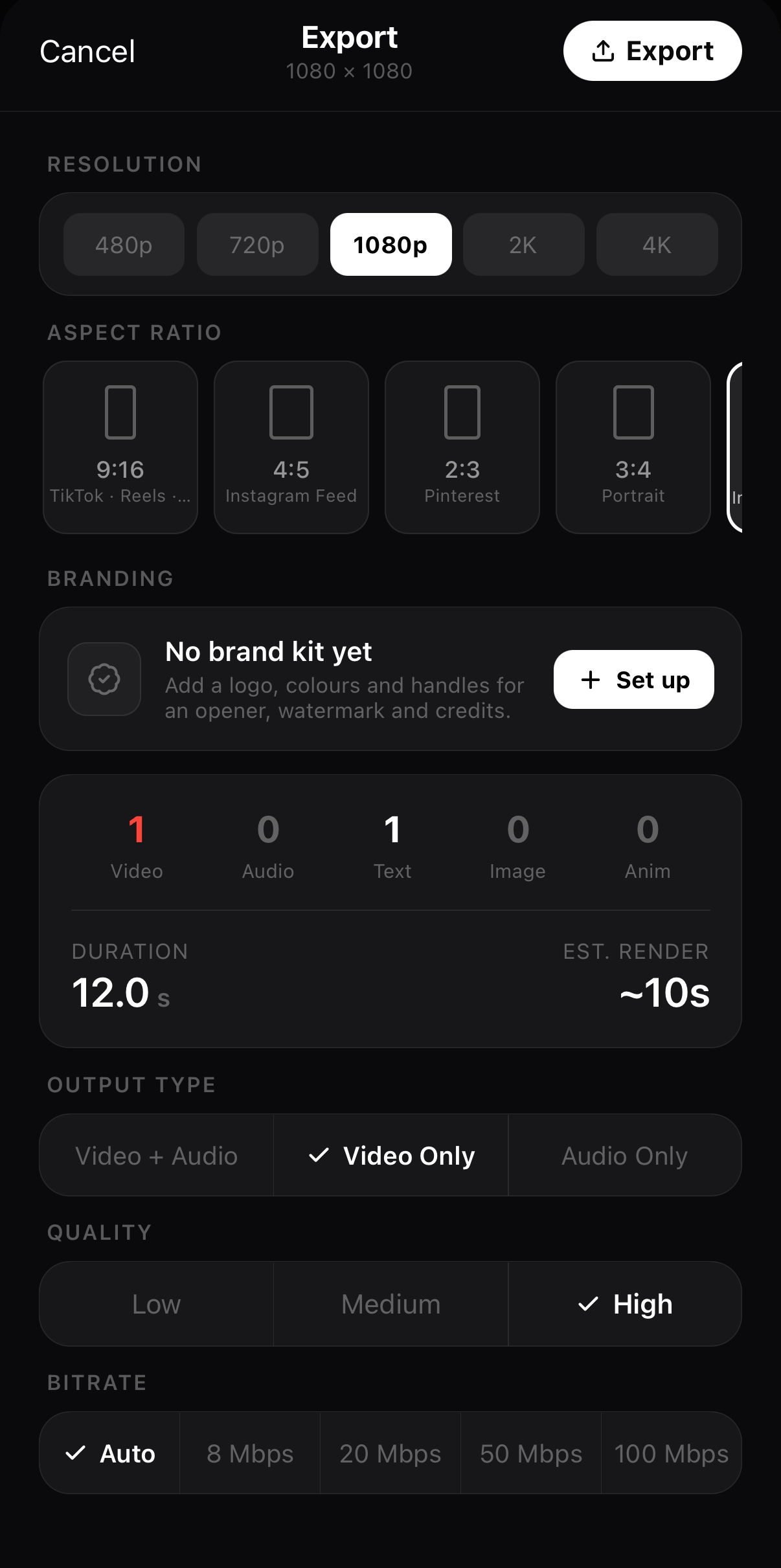
Tap ••• ▸ Export Video and pick 1080p, Video Only (Etsy removes audio anyway) and High quality. A 15-second square clip lands well under 100 MB. Our export settings guide walks through the sheet. The file saves to your camera roll, ready for the Photo & video tab in Shop Manager.
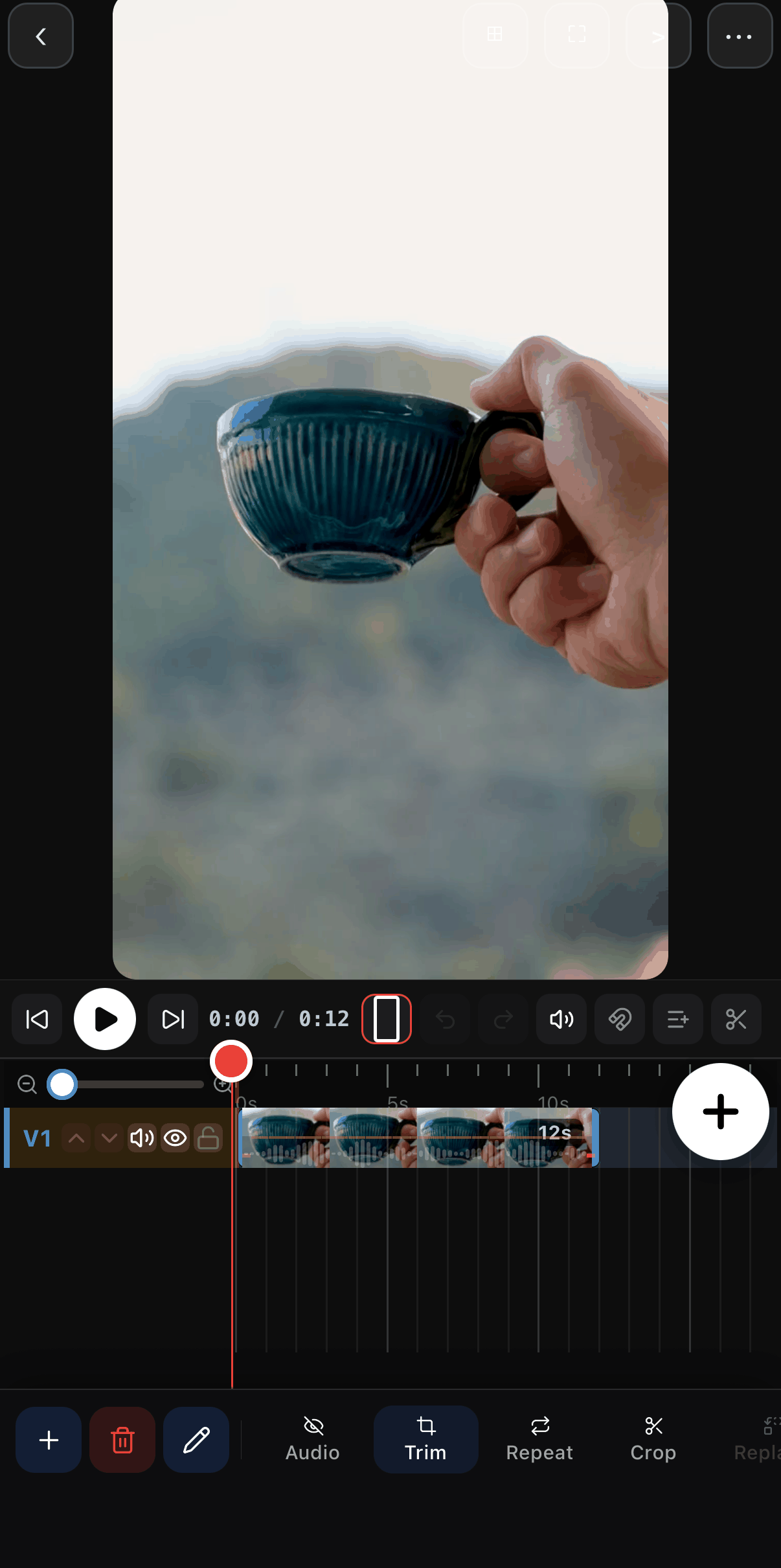 12 s on the timeline
Trim
12 s on the timeline
Trim
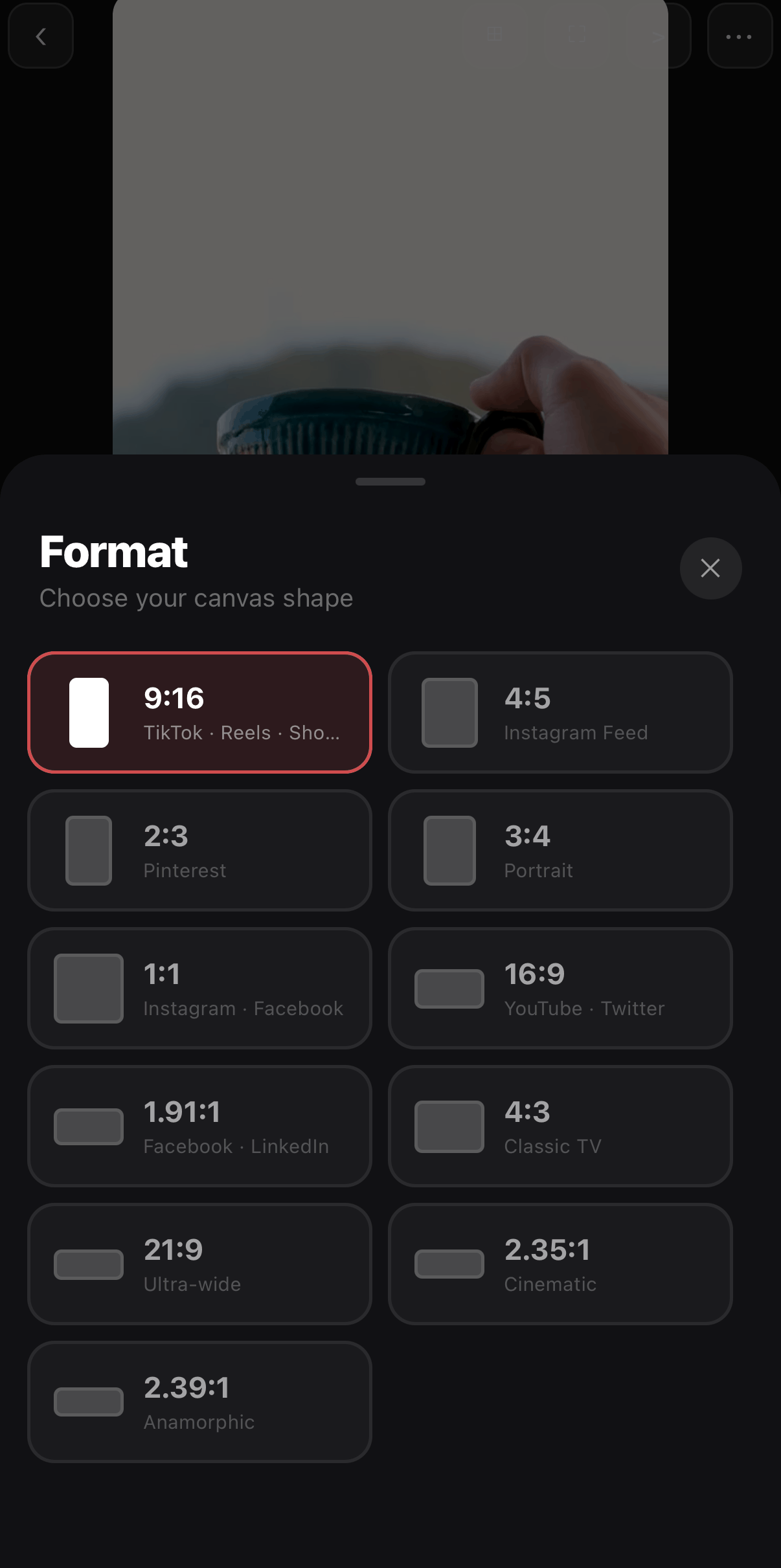 1:1 for Etsy
4:5 also fits
1:1 for Etsy
4:5 also fits
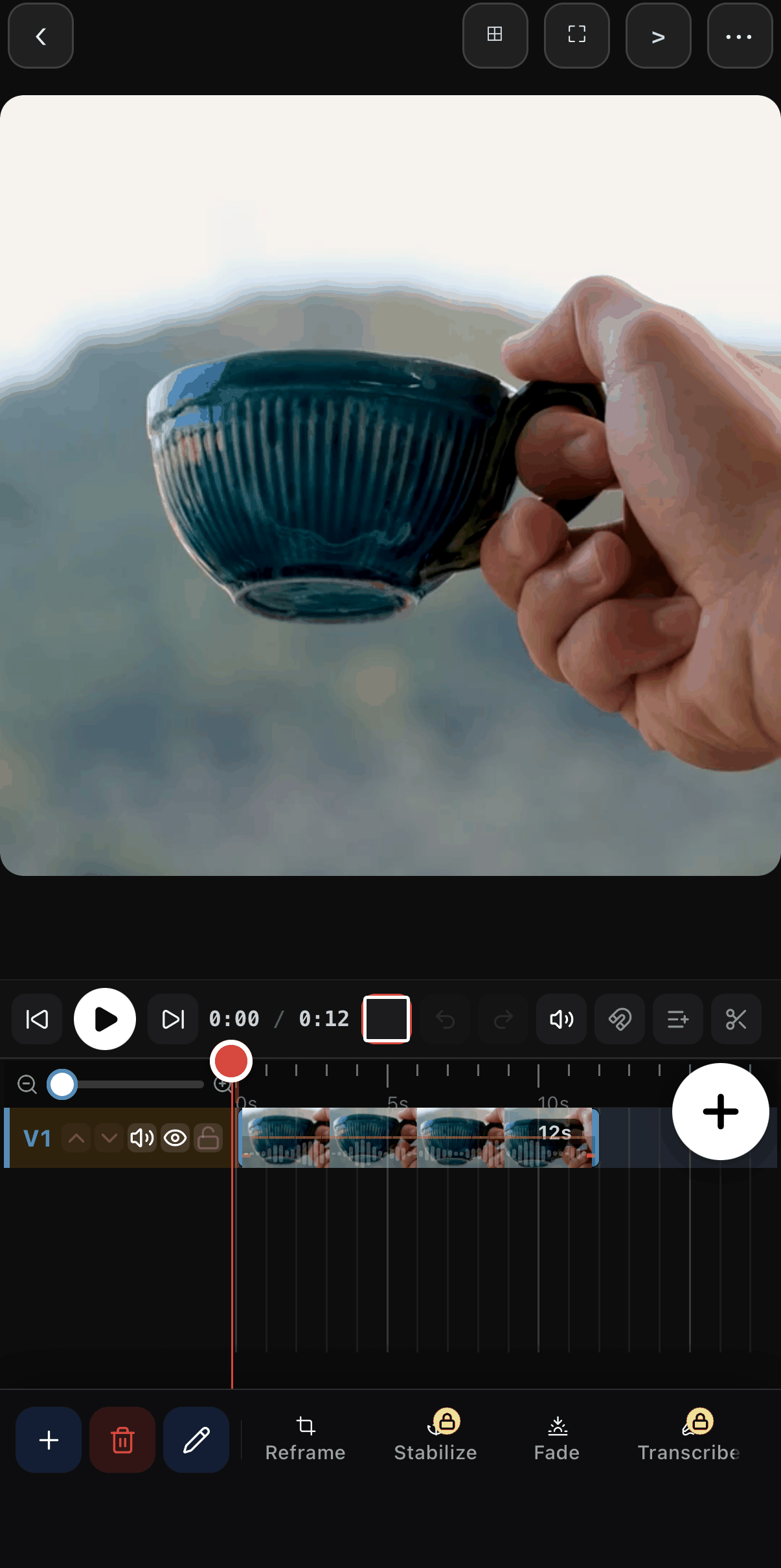 Reframe
Stabilize
Reframe
Stabilize
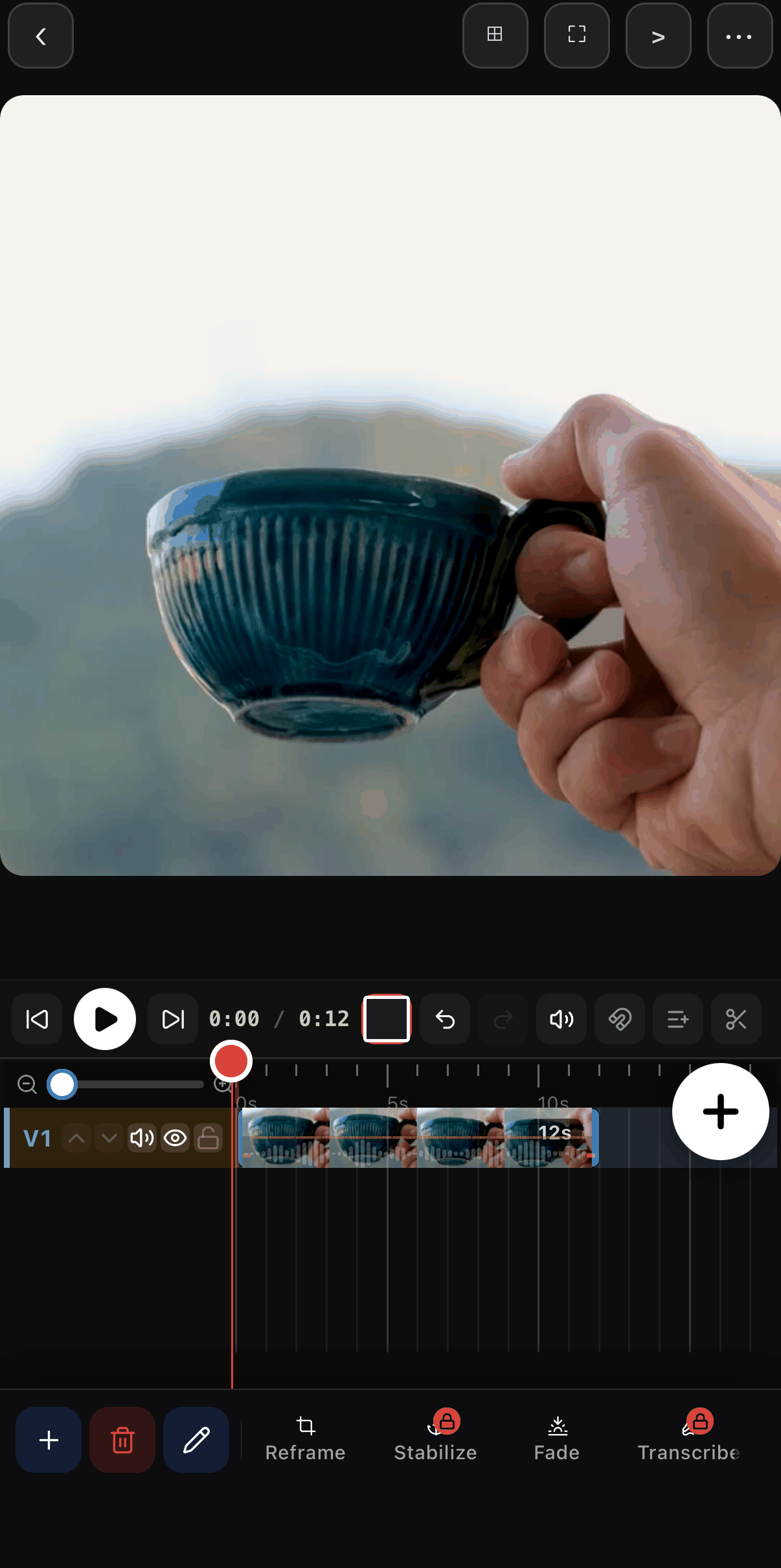 Centred by Reframe
 Wheels · Curves · HSL
Waveform scope
Wheels · Curves · HSL
Waveform scope
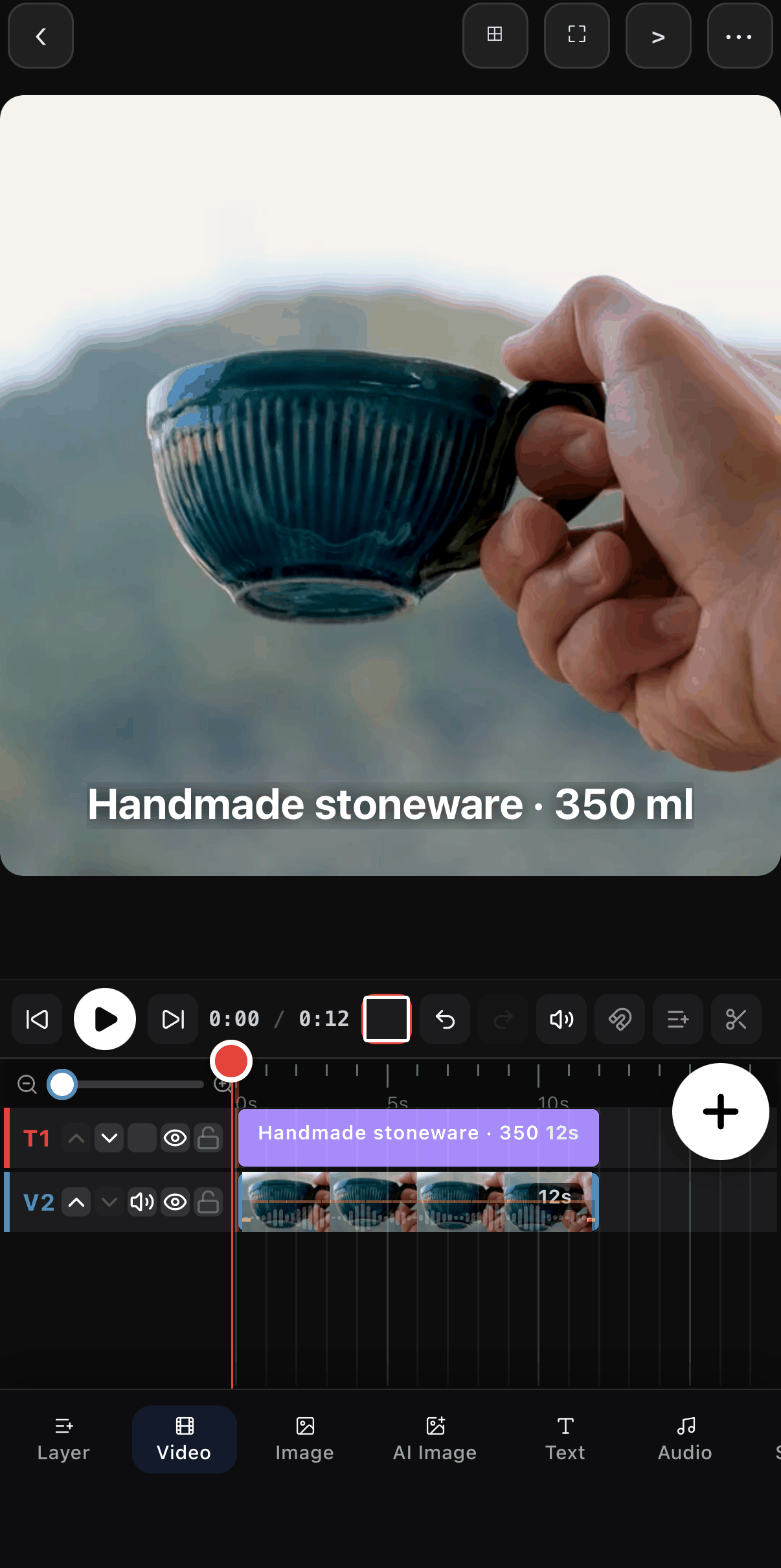 Size and material, on screen
Text
Size and material, on screen
Text
 1080p
12 s
Video Only
1080p
12 s
Video Only
Why ExpoCut for Etsy content?
The new rules reward tools that keep you in control: of what gets generated, of where your photos go, and of what you can honestly write in the disclosure line. ExpoCut is an editor first, so a listing video starts from footage you filmed, and every AI tool is a separate button you choose to press.
A listing video begins with a clip of the real item. Trim, reframe, steady, caption, export. What buyers see is the thing you will ship, which is the whole point of the policy.
Accurate representationEditing, the on-device AI tools and the export all run on the phone. Your product photos are not uploaded to anyone's server and are not used to train a model. See how ExpoCut keeps editing private.
Your photos stay yoursCreate Image, Create Video, Animate Photo and Background Remover are separate, opt-in tools with their own labelled sheets, and the on-device ones ask for a one-time agreement first. Ordinary edits never call them, so the disclosure sentence writes itself: you know exactly what was AI.
Easy disclosureThe Color panel shows a histogram, waveform and vectorscope while you drag, so a white-balance fix stays a fix instead of a makeover. "Match real life" is the one colour edit Etsy allows, and the scopes let you see that you stayed inside it.
Match real lifeEvery edit is non-destructive and lives in one self-contained project file you can reopen later. The camera original is never overwritten, and if anyone asks how a video was made, you have the record.
Show your workBrand profiles keep your logo, colours and bumpers the same across thirty product videos, and templates let you fill the next one in minutes. Automation here renders videos from footage you chose; it never writes or publishes a listing.
Human oversightEditor versus generator
Most “AI product photo” tools start from a prompt and give you a picture of an item that does not exist. That is the exact content Etsy’s new listing-form guidance is built to catch. An editor works the other way round:
| AI product-image generator | ExpoCut | |
|---|---|---|
| Starting point | A prompt, or one photo it reimagines | Footage and photos you shot |
| What buyers see | An approximation of the item | The item |
| Etsy’s AI-image guidance | What it is designed to flag | Nothing to detect in an ordinary edit |
| Disclosure | Required: the imagery is AI-created | Only if you chose an AI tool |
| Where your photos go | Uploaded to a server | Stay on the phone |
| The required unedited photo | Cannot produce it | Cannot produce it either: use the camera file |
The Free plan includes the full editor and 4K export; its only mark is the 3-second outro card at the end, which is why the recipe above keeps the edit at 12 seconds. Pro and Elite export clean. Plans are listed on the pricing page.
Which ExpoCut features should Etsy sellers avoid for listing images?
ExpoCut ships generative tools, and they are the wrong tool for a listing of a physical item:
| Feature | Etsy listing of a physical item | Social ads and reels |
|---|---|---|
| Create Image, Create Video, Animate Photo | No. A generated picture of your item is the prohibited “AI approximation”. | Fine with a disclosure, and from 2027 mind the synthetic-performer rule. |
| Background Remover | Secondary photos only, never the required photo, and note it in the description. | Fine. |
| AI Change (edit a picture by prompt) | No. Changing an item’s look is a prohibited edit. | Fine. |
| Filters and LUTs | Not on the item. Allowed on backgrounds and secondary shots if the item stays accurate. | Fine. |
| Text-to-speech and Clone Voice | Irrelevant: Etsy removes audio. | Fine, but an AI voice presenting as a person may need an SB 1050 disclosure in 2027. |
If you want to see what these tools do for your marketing content, our guide to creating images and videos with AI explains them. Just keep them out of the listing.
Pre-publish checklist
- One photo straight from the camera: real item, real background, no edits, not opened in any app.
- First photo is the most realistic one.
- Secondary photos: colour matches real life, no hidden flaws, backgrounds swapped only if the item is untouched.
- Patterns, recipes, kits and seeds: a real, unedited photo of a finished result.
- AI art: a disclosure sentence in the description and the Designed by path in How it’s made.
- AI-edited photos: a line in the description saying which ones.
- Listing videos: real footage, 5–15 s, 1:1 or 4:5, 1080p, under 100 MB.
- Nothing in the listing was generated by a script without you looking at it.
This guide is part of our complete mobile video editor guide, and we’ll update it as Etsy expands enforcement. It is a practical summary, not legal advice; for the California disclosure question, Etsy itself suggests asking a lawyer.
Sources
All rules above come from Etsy’s own pages, read on October 23, 2026:
- Important updates to AI use on Etsy — Seller Handbook announcement, October 22, 2026
- Listing Image Requirements — Our House Rules, last updated October 22, 2026
- What’s Etsy’s Stance on AI Creations? — Seller Handbook, October 22, 2026
- Etsy’s Creativity Standards — Our House Rules, last updated June 10, 2025
- How to Add Listing Videos — Etsy Help Center
Frequently asked questions
Does cropping count as editing the required Etsy photo?
Yes. Etsy's policy says the required photo must not be edited or changed in any way, and its own seller article lists cropping, resizing and straightening among the edits you may only apply to your other photos. Upload the required one exactly as the camera saved it.
Can I still use AI to remove or replace the background on Etsy photos?
On your secondary photos, yes — Etsy explicitly allows cleaning up or replacing the background as long as the item itself is accurately shown. Never on the one required unedited photo, and Etsy asks you to mention AI edits in the listing description.
Is AI-generated art still allowed on Etsy after the October 2026 update?
Yes. Etsy continues to allow AI-generated art when the seller played a clear creative role, such as writing the original prompts, and discloses the AI use in the listing description. You cannot present it as handmade or entirely your own work, and prompt bundles remain banned.
Do Etsy's new AI rules apply to listing videos?
The unedited-photo rule is about photos, and Etsy's listing video specs did not change. But Etsy's Creativity Standards already require original photo or video content of the final product, so an AI-generated clip of a physical item would be misleading imagery. Film the real item.
What happens if Etsy flags my photo as AI-generated?
Right now the listing form shows tips when Etsy detects an AI-generated image, and buyer reports of 'misleading AI imagery' are used for research rather than immediate action. Etsy says proactive enforcement will grow over the coming months, and removed listings can be appealed from the Policy violations page in Shop Manager.
Related guides
Film the real thing, then edit the rest
Trim, reframe, steady and caption your product footage on your phone. Nothing uploads, and the export is ready for Etsy's 15-second limit.
Get ExpoCut Browse all guides